Pregnancy Journey – Baby Track
- 0.0
- Rating
- 100.00K
- Installs
- Free
- Price

 Analysis by App-foxy
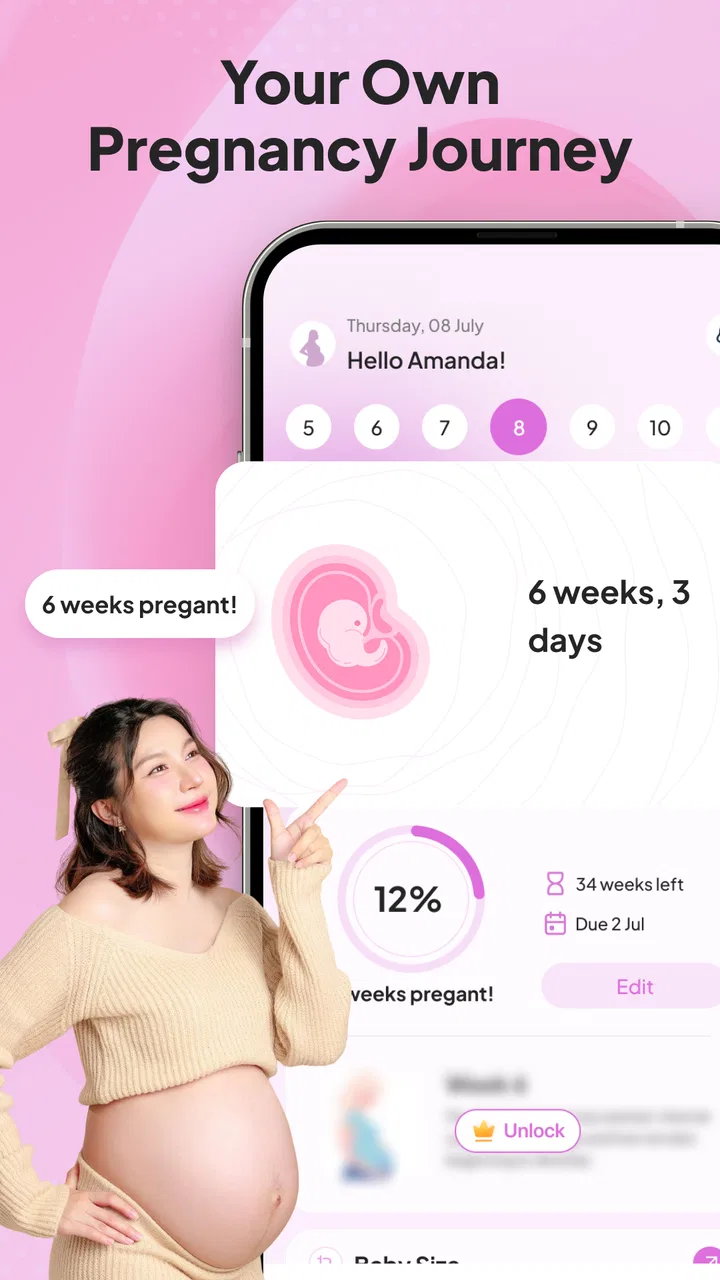
Pregnancy Journey – Baby Track is the kind of parenting app I would open when I want a simple, reassuring view of pregnancy progress rather than a crowded health dashboard. Its focus is easy to understand: follow pregnancy week by week, see baby-growth updates, keep an eye on the due date, and use the app as a small reference point during an otherwise busy routine. I found that narrow purpose appealing because pregnancy information can quickly become overwhelming when every screen tries to cover nutrition, appointments, symptoms, exercise, shopping, and medical advice at once.
The app is made by MomenHaz998 and is available free of charge, with optional in-app purchases priced from $9.99 to $19.99 per item. It sits in the parenting category, is suitable for Everyone, and supports devices running Android 7.0 or later. The current release is version 1.0.5. It has passed the 100K-plus install mark, although its average rating is currently 0.0, so I would treat the download count as evidence of interest rather than proof that it will suit every expectant parent.
How Pregnancy Journey feels in everyday use
My first impression is that this is best understood as a pregnancy companion, not a replacement for a midwife, doctor, ultrasound appointment, or clinical record. The week tracker gives the experience a natural rhythm. Instead of asking me to study a large library, it encourages a quick check-in around the current stage of pregnancy. That makes it useful for someone who wants a few minutes of context without turning every day into a research project.
You May Also Like

 Blood Strike: 2.5 Anniversary
Blood Strike’s Loadouts Turn Every Drop Into a Tactical Gamble
A close look at Blood Strike’s custom loadouts: how fast access to signature weapons reshapes its battle royale rhythm, rewards preparation, and narrows the gap between fights.

 Pandora - Music & Podcasts
Pandora’s Music Is Easy to Start, but Harder to Recover
Pandora’s strength is its low-effort path from a seed to a station. Its weak spot is how much confidence it asks you to place in connection, setup, and quiet recovery.

 8 Ball Pool
 Is Built on Rivalries, Rematches, and Routine
A close look at the rivalries, rematches, shared routines, and unanswered safety questions that turn a quick pool match into a persistent mobile community.

 Samsung Music
’s Quiet Strength Is Playing What You Already Own
Its reach comes less from spectacle than from dependable access to a personal library. That simplicity is both the app’s strongest retention engine and its ceiling.

 AccuWeather: Weather Radar
AccuWeather Review: A Quick, Clear Forecast for Everyday Decisions
For everyday plans, the best forecast is the one you can understand quickly. AccuWeather makes rain timing, radar, and local conditions easy to act on, with a few trade-offs.

 Hill Climb Racing
Why Hill Climb Racing Still Turns Crashes Into One More Run
A tiny car, a bumpy hill and one more upgrade: Hill Climb Racing keeps resurfacing because its simple chaos makes every near-miss feel personal.
More From Our News Desk



The due-date element is especially practical because it gives the rest of the app a clear anchor. A date is easier to relate to than a collection of disconnected articles. When I think about planning a hospital bag, arranging time away from work, or explaining progress to a partner, a visible pregnancy timeline is more useful than a general list of facts. The important detail is to enter the starting information carefully. A tracker can only be as helpful as the date used to calculate the journey, so I would check the result against the date given by a healthcare professional.
The baby-growth updates also make the app more approachable for people who enjoy seeing development presented in stages. I like this format because it turns a long pregnancy into smaller milestones. It can give a couple something to discuss together, or help a first-time parent put a week into perspective. Still, I would read these updates as broad educational guidance, not as a measurement of an individual baby. Real pregnancies do not follow a perfectly identical timetable, and the app should not be used to judge whether a pregnancy is progressing normally.
Speed expectations and the value of short visits
For this type of app, speed matters less than it does in a game or social network, but it still affects whether I return. A pregnancy tracker should support quick visits: open it, check the current week, review the relevant growth note, and leave. Pregnancy Journey – Baby Track is most attractive when used in that lightweight way. Its focused purpose suggests a lower mental burden than a broad parenting platform, because I am not forced to navigate unrelated tools before reaching the information I came for.
I would not expect a week tracker to be demanding during ordinary use. The main workflow is naturally suited to brief sessions rather than continuous activity. That matters for someone checking the app while commuting, waiting for an appointment, or sitting beside a partner at the end of the day. The useful performance question here is not whether it performs elaborate calculations in real time, but whether it lets me find the current stage without friction.
One practical habit improves the experience: I would set the due-date information once, then use the app as a regular reference instead of repeatedly changing entries to match every new estimate. Due dates can be discussed or adjusted by healthcare professionals, but casual edits can make a personal tracker confusing. Keeping one trusted reference date until there is a genuine reason to update it makes the weekly view more consistent.
The free entry point is another reason the app is easy to try. I can test whether the tone, layout, and amount of information fit my needs before considering any paid item. That is important because the optional purchases are not a small add-on in the same sense as a low-cost tip; each item falls between $9.99 and $19.99. I would therefore avoid buying immediately. I would first use the free experience through several weekly check-ins and decide whether the extra value is clear enough for my routine.
What happens during heavier use
The app is unlikely to be used like a high-intensity entertainment title. Its heavier moments are more realistic and personal: opening it repeatedly during a week of appointments, showing growth information to a partner, checking the due-date view while making plans, or returning to it after missing several days. Those are the situations where a focused design can help, but they are also where expectations need to stay sensible.
If I were using it during a busy appointment week, I would use the app before the visit to remember the current pregnancy stage and after the visit to keep the general timeline in mind. I would not rely on it to store or interpret medical results unless that function is clearly presented within the app. This distinction is important: a broad growth update can support conversation, while a clinical result requires professional explanation.
A second realistic scenario is a partner who wants to participate but does not know what to ask. A short weekly update can become a conversation starter. One person might open the current stage while the other looks at practical preparations for the coming weeks. The app’s value here is not that it solves pregnancy planning, but that it gives both people a shared starting point. I find that more useful than sending random articles back and forth, where context and accuracy can vary.
Heavy use can also expose a limitation of simple trackers: they may not replace a more complete pregnancy organizer. If I need appointment scheduling, medication reminders, symptom logging, nutrition planning, or detailed notes, I would compare this app with a fuller pregnancy platform. Pregnancy Journey – Baby Track is more appealing when I want the central timeline and growth perspective without committing to a large personal-management system.
Reliability, trust, and sensible boundaries
Reliability in a parenting app is not only about whether the screen opens. It is also about whether I understand what the information means and whether the app encourages appropriate decisions. The week-by-week structure is inherently easy to follow, but I would still keep medical judgment outside the app. If a symptom worries me, I would contact a qualified professional rather than search for reassurance in a general growth update.
The app’s Everyone age rating makes it approachable for a household, including partners or relatives who want a simple overview. That does not make every piece of pregnancy information suitable for making health decisions without context. I see the age rating as a statement about general accessibility, not a guarantee that the app covers every concern an adult user may have.
The current version, 1.0.5, indicates a relatively early product stage in practical terms. I would approach it with reasonable expectations: it may be a useful focused tracker, but I would not automatically assume the depth or polish of a long-established medical resource. The average rating of 0.0 also means there is no meaningful rating signal to lean on yet. In my view, that makes personal testing more important. Install it, check how clearly it handles the due date and weekly view, and only then decide whether it deserves a regular place on the phone.
There is also a trust trade-off around paid content. Since in-app purchases range from $9.99 to $19.99 per item, I would read each purchase description carefully before confirming anything. A free app can be useful on its own, but the presence of paid items means I would not assume every attractive section is included without checking. This is not a reason to reject the app; it is a reason to make the purchase decision slowly and based on a specific need.
My most important reliability tip is to use the app alongside, not instead of, the information provided by a healthcare team. I would compare the due-date basis with my medical paperwork, treat development notes as general context, and keep urgent questions out of the tracker. That workflow preserves the app’s strength while avoiding the common mistake of expecting an educational companion to function as a diagnostic tool.
Device constraints and practical expectations
Android compatibility begins with version 7.0, which gives the app a broad potential device range. That is helpful if someone is using an older phone or sharing a household device rather than upgrading regularly. At the same time, compatibility alone does not tell me how comfortable the experience will be on every screen size. On a smaller or older handset, I would pay attention to text readability and how easily the weekly information can be scanned.
Because this is a reference app rather than a graphics-heavy game, I would expect it to fit naturally into ordinary phone use. The more important constraint is attention. Pregnancy information is often read when someone is tired, distracted, or emotionally overloaded. A screen that asks me to process too much at once would be a problem even if it technically runs well. I would favor the app’s concise weekly workflow over prolonged browsing, especially late at night or between appointments.
Storage and battery are also best considered in proportion to the app’s role. I would not install it expecting entertainment value throughout the day. Its sensible place is as a quick-access utility. If I were trying to conserve space or reduce notifications, I would keep only the pregnancy tools I actually use and avoid paying for extras simply because they are available. The app makes the most sense when it remains a calm, occasional reference rather than another source of daily pressure.
Another device-related consideration is shared viewing. A partner may want to look at the current week, but I would avoid handing over the phone during a private medical conversation or leaving sensitive notes visible if the app is used alongside other personal information. The basic growth-and-date concept is easy to share, yet pregnancy itself remains personal. A quick glance is fine; treating the phone as a communal medical file is less sensible.
Who will appreciate it, and who should choose something else?
I would recommend Pregnancy Journey – Baby Track to someone who wants a straightforward pregnancy timeline, a due-date reference, and baby-growth context in one focused app. It is particularly suitable for a first-time parent who wants a gentle weekly structure, or for a partner who needs an accessible way to follow along. The free starting point makes it reasonable to test without committing to a purchase.
I would be more cautious recommending it to someone who expects a complete pregnancy-management system. If your priority is detailed symptom records, appointment management, medication tracking, extensive clinical explanations, or structured communication with a medical team, a more comprehensive alternative may be a better fit. The same applies if you want a large community, expert consultations, or a deeply personalized health dashboard. A focused tracker should not be penalized for lacking every possible tool, but it should be chosen for what it does best.
I would also skip it if pregnancy information tends to increase your anxiety. Weekly comparisons and growth descriptions can be comforting for one person and stressful for another. In that situation, I would use only the practical due-date function, or choose a tool with stronger control over reminders and content exposure. The best pregnancy app is not the one with the most information; it is the one that supports your routine without making you feel monitored by your own phone.
My performance verdict after weighing the trade-offs
My overall view is that Pregnancy Journey – Baby Track has a clear, useful role: it turns pregnancy into an easy-to-follow weekly journey with baby-growth updates and a due-date focus. Its likely strength is not technical spectacle but simplicity. Short visits, shared viewing with a partner, and a quick reminder of the current stage are the situations where I see the most value.
I would describe its performance expectations as modest and practical. It is designed for checking rather than constant interaction, so I would judge it by how comfortably it supports those brief moments. The main friction comes from the uncertainty around how much depth the free experience provides, the relatively high range of optional purchase prices, and the absence of a useful average-rating signal at present. Those points make a cautious trial more sensible than an immediate paid commitment.
The developer, MomenHaz998, has positioned this as a parenting app rather than a substitute for professional care. I appreciate the focused idea, but I would keep the boundaries clear: use the timeline for orientation, use growth updates for general context, and take health concerns to a qualified professional. That approach also answers the most important practical question—whether the app can fit into real life. For a calm weekly check-in, yes. For complete pregnancy management or medical decision-making, no.
My recommendation is to start with the free version, confirm that the due-date and weekly views match your expectations, and wait before considering any paid item. If you want a compact companion for following pregnancy progress, it is worth trying. If you need a robust organizer or clinical resource, I would look elsewhere and keep this kind of tracker, at most, as a secondary reference.
FAQs for Pregnancy Journey – Baby Track
01What features does Pregnancy Journey – Baby Track offer?
Pregnancy Journey – Baby Track offers a range of features designed to support expecting parents. Users can track their pregnancy week by week, monitor baby movements, and receive health tips. Additionally, the app provides a diary function for personal notes and a contraction timer for labor preparation. It also includes nutritional advice and reminders for doctor appointments.
02Is Pregnancy Journey – Baby Track available for both Android and iOS?
Yes, Pregnancy Journey – Baby Track is available on both Android and iOS platforms. The app can be downloaded from the Google Play Store for Android devices and the Apple App Store for iOS devices. This ensures that a wide range of users can access and benefit from its features, regardless of device preference.
03Does Pregnancy Journey – Baby Track require an internet connection to use?
While some features of Pregnancy Journey – Baby Track may require an internet connection, such as syncing across devices or accessing updated content, many core features are available offline. Users can track their pregnancy progress, use the diary, and access saved tips without needing a continuous internet connection, making it convenient for on-the-go use.
04How does Pregnancy Journey – Baby Track ensure user data privacy?
Pregnancy Journey – Baby Track prioritizes user privacy by implementing comprehensive data protection measures. The app uses encryption to safeguard personal information and adheres to strict privacy policies. Users have control over their data, with options to manage settings and permissions. Additionally, the app does not share personal data with third parties without user consent.
05Is Pregnancy Journey – Baby Track suitable for first-time parents?
Absolutely. Pregnancy Journey – Baby Track is designed to be user-friendly and informative, making it ideal for first-time parents. The app provides detailed guidance on pregnancy progress, health tips, and baby development. It also includes a community feature where new parents can connect with others for support and advice, enhancing the overall experience.
Pros
- User-friendly interface for easy tracking
- Offers personalized health tips
- Includes a contraction timer feature
- Supports multiple language options
- Daily updates on baby's development
Cons
- Some features require in-app purchases
- Occasional ads can be disruptive
- No offline access available
- Limited customization in reminders
- Data sync issues reported by users

Pregnancy Journey – Baby Track
Gallery